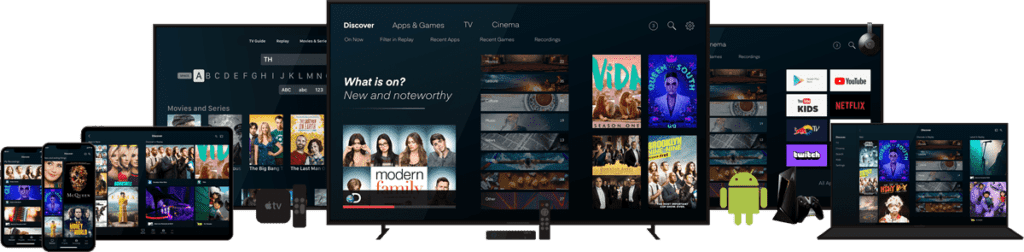
IPTV Smart TV – Samsung and LG
Many Samsung and LG televisions can use compatible IPTV apps directly without an external streaming box. App availability may depend on the exact TV model, operating system and region.
Compare Smart TV IPTV apps →IPTV Device Guide
Watch your IPTV subscription on Smart TV, Android TV, Fire Stick, mobile, tablet, PC and more with easy setup guidance.
Device compatibility may vary depending on the app, device model, region and subscription package.
Choose the device you use and follow a simple setup guide.
DEVICE COMPATIBILITY 2026
IPTV can work on many modern devices, but the best setup depends on your operating system, available apps and preferred login method. Compare the main device categories below before choosing your player.
Many Samsung and LG televisions can use compatible IPTV apps directly without an external streaming box. App availability may depend on the exact TV model, operating system and region.
Compare Smart TV IPTV apps →Amazon Fire TV devices are a flexible choice for IPTV because compatible players can support M3U playlists, Xtream Codes login and TV-friendly remote navigation.
IPTV Fire TV Stick setup guide →An IPTV box or Android TV Box can add streaming apps to almost any television with HDMI. Android-based boxes usually provide broad player compatibility and flexible setup options.
Find compatible IPTV players →Windows users can use compatible desktop IPTV players for playlist testing, troubleshooting and full-screen viewing. PC playback is also useful for checking a setup before configuring the same access on another device.
Test your IPTV setup →Apple TV, iPhone, iPad and Mac users can choose from compatible player apps depending on the platform. Check app availability, supported login methods and device compatibility first.
View IPTV apps and players →Many devices support both M3U playlists and Xtream Codes through compatible apps. M3U usually uses a playlist URL, while Xtream uses a server URL, username and password.
Select a device above to view recommended apps, setup method, required details, and step-by-step instructions.
Selected device
Use compatible IPTV apps on Samsung Smart TV for a clean home viewing experience.
Best for: Home entertainment
Compatibility may vary depending on device model, app availability and region. Contact us to confirm the best setup option for your device.
Compatible devices: Android TV, Android TV Box, Fire Stick, Android Phone / Tablet
Setup type: M3U / Xtream Codes
Popular beginner-friendly layout with live TV, VOD and series sections.
Compatible devices: Android TV, Android TV Box, Fire Stick
Setup type: M3U / Xtream Codes
Great TV-style navigation and strong EPG support.
Compatible devices: Android TV, Android TV Box, Fire Stick, Android Phone / Tablet
Setup type: M3U / Xtream Codes
Balanced interface for live channels and catch-up where supported.
Compatible devices: Samsung Smart TV, LG Smart TV, selected Android TV devices
Setup type: M3U / Xtream Codes
Common option for Smart TV users.
Compatible devices: Samsung Smart TV, LG Smart TV, selected TV models
Setup type: M3U / Xtream Codes
Often used with app ID or MAC-based activation workflows.
Compatible devices: Samsung Smart TV, LG Smart TV, selected Smart TVs
Setup type: M3U
Simple Smart TV player for playlist loading.
Compatible devices: Samsung Smart TV, LG Smart TV, selected Android TV devices
Setup type: M3U / Xtream Codes
Alternative interface with subtitle and display options.
Compatible devices: Windows PC, MacBook / iMac, iPhone / iPad, Android Phone / Tablet
Setup type: M3U
Lightweight player for quick playlist tests and playback.
Compatible devices: Android TV, Android TV Box
Setup type: M3U / Xtream Codes
Clean layout favored by users who want flexible playlist controls.
Compatible devices: Android TV, Android TV Box, Fire Stick
Setup type: M3U / Xtream Codes
Advanced sorting and stream organization tools.
Compatible devices: iPhone / iPad, MacBook / iMac
Setup type: M3U / Xtream Codes
Widely used Apple ecosystem option where available.
Compatible devices: Formuler Box
Setup type: Portal / Xtream Codes
Dedicated Formuler experience with direct portal integration.
We do not own or operate third-party apps. App availability and compatibility may vary depending on your device, model, app store and region.
Depending on your device and app, you may receive one of these setup options:
If you are not sure which option your device needs, contact us on WhatsApp and we will guide you.
| Device | Best For | Setup Difficulty | Recommended For |
|---|---|---|---|
| Smart TV | Home viewing | Easy | Families |
| Fire Stick | Simple streaming | Easy | Beginners |
| Android TV Box | Flexible setup | Easy/Medium | Advanced users |
| Mobile / Tablet | Watching anywhere | Easy | Travelers |
| Windows / Mac | Desktop viewing | Easy | PC users |
| MAG / Formuler | Dedicated IPTV device | Medium | IPTV-focused users |
| Enigma2 / Dreambox | Advanced setup | Advanced | Technical users |
Quick setup responses from our team based on your exact device model.
Request a free test to verify app performance on your own setup first.
Use one subscription workflow across TVs, streaming sticks, phones and PCs.
Streaming quality options tailored to your device and internet performance.
Broad category access for different language and content preferences.
Clear steps for Xtream Codes, M3U and portal-based setup methods.
Channel and quality availability may vary depending on package, device and internet speed.
Yes, many Samsung Smart TVs can use compatible IPTV apps. App availability may depend on your TV model and app store region.
Yes, many LG Smart TVs support IPTV apps. Contact us and tell us your TV model so we can suggest the best setup option.
Yes, Amazon Fire Stick and Fire TV are popular devices for IPTV streaming with compatible apps.
Yes, IPTV can work on iPhone, iPad, Android phones and tablets using supported IPTV apps.
No. You can also use Android Box, Fire Stick, PC, Mac, smartphone, tablet or compatible IPTV boxes.
Yes, you can contact us on WhatsApp and we will guide you depending on your device.
Yes, you can request a free test before choosing your subscription.
It depends on your device. Select your device on this page or contact us on WhatsApp and we will recommend the best option.
Contact us on WhatsApp, tell us your device model, and we will help you choose the best setup option. You can also view IPTV pricing.
Check My Device on WhatsAppWant to understand how IPTV works? You can read more about Internet Protocol Television on Wikipedia before exploring our Channels List and choosing the best IPTV plan for your device.